Parts of a 3D Printer
Identify the motion system, extrusion path, and thermal control parts on an FDM printer and connect each to the most common failure symptoms (adhesion, gaps/under-extrusion, stringing, ringing, layer shifts, and heat-creep jams) so you can troubleshoot by checking the right hardware first.
TL;DR
3D printers look complicated, but most of the machine is just a few important parts working together. The basic idea is simple: a 3D printer pushes plastic through a heated nozzle and places it layer by layer to build an object. Once you know what each part does, the rest of printing — and most troubleshooting — gets a lot easier.
What an FDM printer really is
This guide covers a common FDM 3D printer. FDM stands for Fused Deposition Modeling — the printer melts plastic filament and lays it down in thin layers, one on top of the next, until the part is built. Everything you'll read about below is some piece of that pipeline: feeding plastic in, melting it, placing it accurately, and making it stick.
Two common layouts
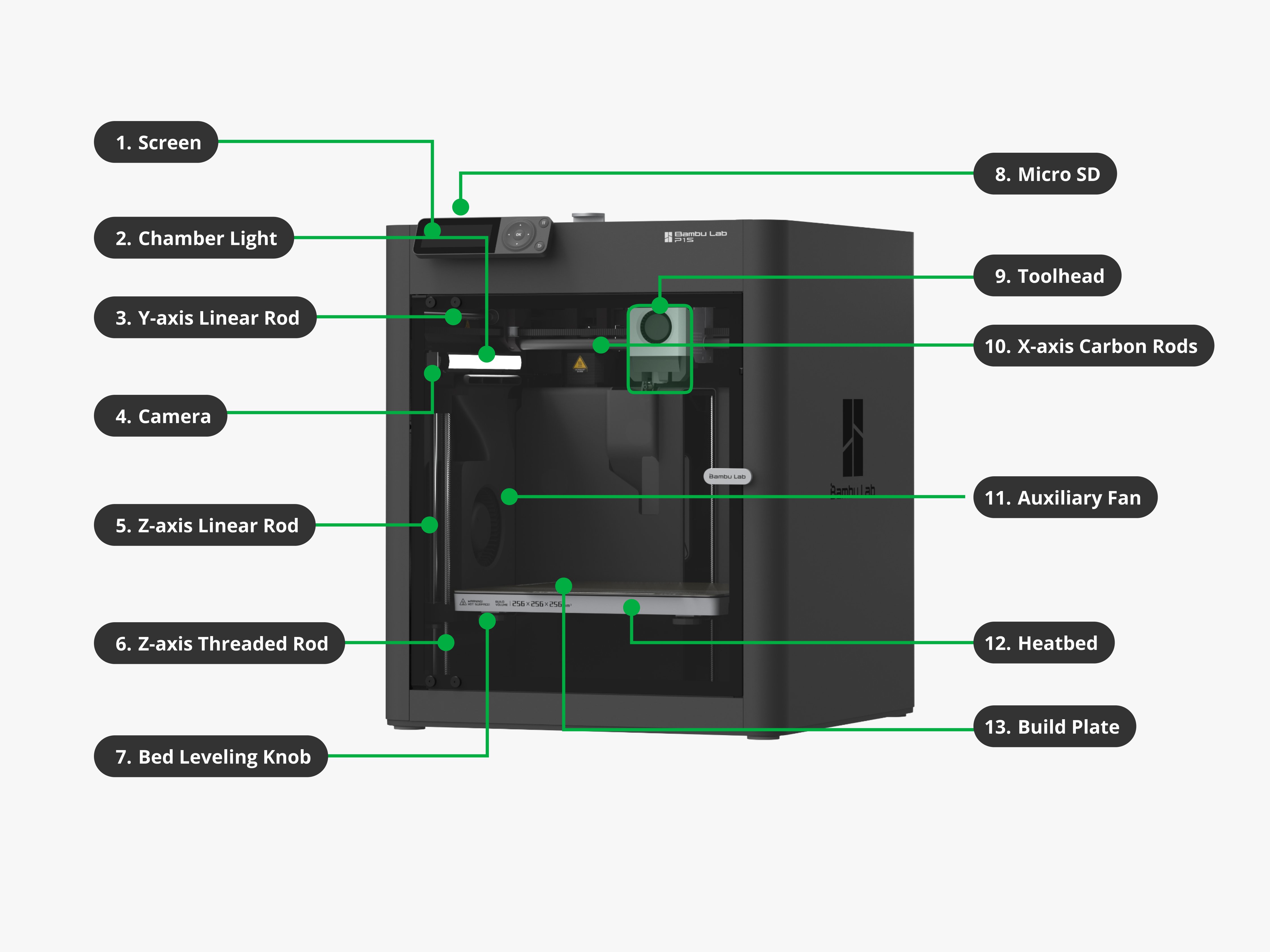
Most FDM printers you'll see today come in one of two layouts. A bed-slinger (also called a gantry or Cartesian printer) moves the toolhead in X and Z, and slides the bed forward and back for Y — the Bambu A1 is a popular example. A CoreXY printer keeps the bed mostly still and moves the toolhead in both X and Y with two coordinated belts, usually inside an enclosed box — the Bambu P1S is a typical CoreXY. Same basic parts, different choreography.

Filament
Filament is the plastic material the printer uses. It comes on a spool and looks like thick string. The printer pulls it in, melts it, and uses it to build the object. The most common types are PLA (easy and beginner-friendly), PETG (stronger and more flexible), ABS/ASA (more heat resistant but harder to print), and TPU (flexible and rubber-like). Think of filament as the "ink" of a 3D printer — except instead of printing flat on paper, it builds something solid.
Extruder
The extruder is the part that pushes filament into the printer. It has small toothed gears that grip the filament and feed it forward. It controls how much plastic gets sent to the hot end. An easy way to think about it: the filament is the material, the extruder is the feeder, and the hot end is what melts it. If the extruder isn't gripping properly, the printer may stop extruding mid-print or produce weak, messy layers.

Hot end
The hot end melts the filament. This is one of the most important parts of the printer — it heats the plastic to a high temperature (often above 200°C, depending on the material). Solid filament goes in, melted plastic comes out through a small nozzle. A hot end is really a small assembly: a heater, a temperature sensor, a metal block, and the nozzle itself. The printer carefully controls the temperature so the plastic melts cleanly without burning.

Nozzle
The nozzle is the small opening where melted plastic comes out. Most standard nozzles are around 0.4 mm wide, and that tiny hole controls how thin each line of plastic is. Nozzle size affects detail, speed, strength, and layer quality. A smaller nozzle prints finer detail but takes longer. A larger nozzle prints faster and produces stronger parts, but with less fine detail.

Heated bed and build plate
The heated bed gives the print something to stick to. The first layer needs to stay perfectly in place — if it moves, the whole print can fail. Warming the bed improves adhesion, especially for materials that shrink or warp as they cool. The bed also has to be level and at the right distance from the nozzle. The build plate is the surface that sits on top of the heated bed. Some are smooth, some are textured. Modern printers usually use a flexible spring-steel sheet — once the print is done, you can pop the plate off and gently flex it to release the part.

Motors, frame, belts, and rails
Motors move the printer's parts into exact positions, usually along three axes: X (left/right), Y (forward/back), and Z (up/down). The computer tells the motors precisely where to go so plastic lands in the right place. The frame holds everything together. A weak or loose frame lets the printer shake, which makes prints look messy. Belts pull the print head or bed back and forth; rails and rods keep that motion straight and smooth. Loose belts cause wavy walls and shifted layers; clean, properly tensioned belts and rails are what makes prints look crisp.

Cooling fan
Once plastic leaves the nozzle, it needs to harden quickly so the next layer has something solid to land on. The cooling fan blows air at the fresh plastic to help it set fast. Cooling especially matters for overhangs, bridges, fine details, and PLA prints — too little cooling and overhangs droop; too much and layers can have trouble bonding (this depends on the material).

Control board and screen
The control board is the printer's brain. It receives the print file and tells everything else what to do — motors, hot end, bed temperature, fans. The instructions come in a file called G-code, which tells the printer where to move, how hot to get, and how much filament to push. Most printers also have a screen or touchscreen where you can start a print, set temperatures, move parts manually, load filament, or check progress. Many can also be controlled from a phone, computer, or web app.